
NEW FEATURE
Answer any vendor portal.
Instantly.
Portal AutoFill is Iris's browser-native feature that fills procurement and security portal fields directly from your verified knowledge base — without copy-paste, without switching tabs, and without leaving the portal. It works inside Whistic, BitSight, OneArch, MS Forms, Navex One, VisioTrust, TFA Forms, and any web-based portal you can open in Chrome.

How Iris Works, Step by Step
Iris is built to handle the entire process: start with smart qualification, then move directly into collaborative, AI-powered response workflows — all in one place.

STEP 1
Qualify
Use AI scoring and market data to decide which projects are worth pursuing.
Score RFPs based on deal fit, historical win rates, and estimated resource investment
Customize decision criteria to align with sales strategy and business priorities
Generate internal go/no-go summaries to streamline bid qualification
Use data-driven pursuit scoring to prioritize the highest-value opportunities
Looking for new opportunities? Build your pipeline with GovSpend.
Explore the Iris + GovSpend Partnership
STEP 2
Respond
Generate high-quality answers instantly, tailored to each RFP’s context and requirements.
Ingest RFPs automatically from portals, Slack, email, and CRMs
Draft high-quality responses instantly using Iris’s AI trained on your company knowledge
Personalize answers to each RFP’s context, and requirements
Collaborate seamlessly by assigning sections, tracking progress, and keeping SMEs aligned
Ensure consistency in tone, branding, and messaging across every submission

STEP 3
Win
Export client-ready proposals that meet branding, formatting, and compliance standards.
Auto-format responses into client-ready, fully compliant documents
Export final responses using your custom templates to match branding and formatting requirements
Track commitment language across proposals to ensure consistency
Use data-driven pursuit scoring to prioritize the highest-value opportunities

STEP 4
Learn
Measure performance, uncover trends, and refine your knowledge for higher win rates.
Analyze response performance to understand what drives higher win rates
Identify content gaps across proposals and knowledge libraries
Surface competitor trends hidden in procurement documents
Track team efficiency with real-time reporting on response speed and quality
Generate internal reports showing:
What promises were made
Who contributed what
Time to completion
Ensure nothing slips through the cracks—before or after submission.
The problem everyone has and nobody talks about.

Built-in bottleneck.
Every procurement portal has its own format. Your team re-enters the same approved content over and over — manually, every time.

Stale answers ship constantly.
When people copy-paste from different sources, you end up with inconsistent responses. One stale answer can sink a deal or trigger a follow-up audit.

No trail. No accountability.
No audit trail means no accountability. When a customer questions a response, your team is digging through emails to figure out what was actually sent.

Everything you need to fill portals fast
without cutting corners.

Auto-Detect Portal Fields
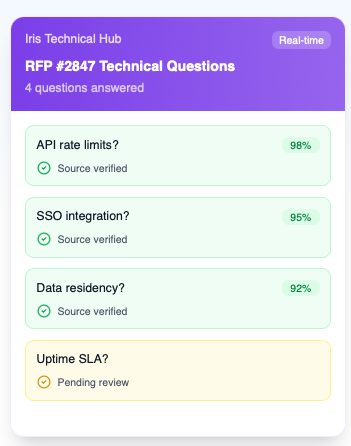
Iris reads the structure of any procurement portal and maps every field to the right answer in your content library — automatically, before you type a single character.
Recognizes Whistic, BitSight, OneArch, MS Forms, Navex One, VisioTrust, and TFA Forms out of the box
Semantic matching — not keyword search, not copy-paste logic
Flags unmapped fields for manual review instead of guessing

Approved Answers Only
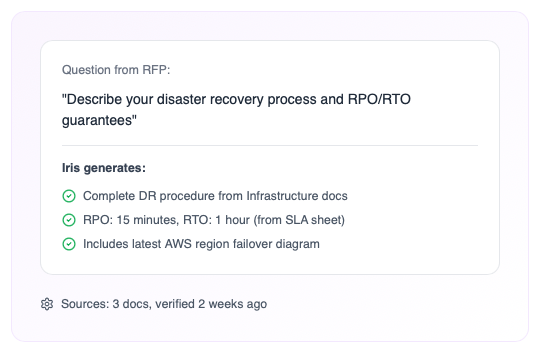
Every response pulls from your verified knowledge base, so every answer is approved, current, and traceable to a source.
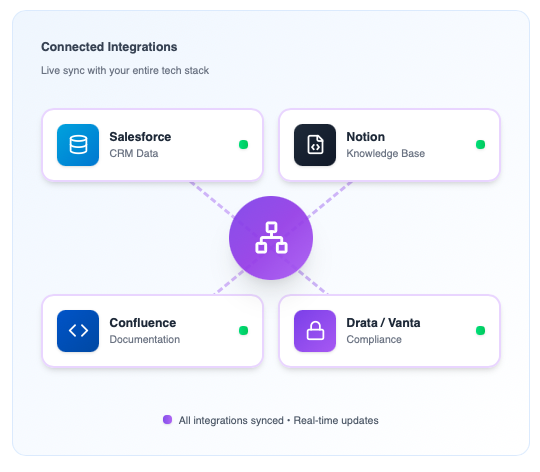
Pulls from your verified content library — Notion, Confluence, Google Drive
Flags low-confidence answers before they ship
No hallucinations — low-confidence answers are flagged, never auto-submitted

Full Audit Trail
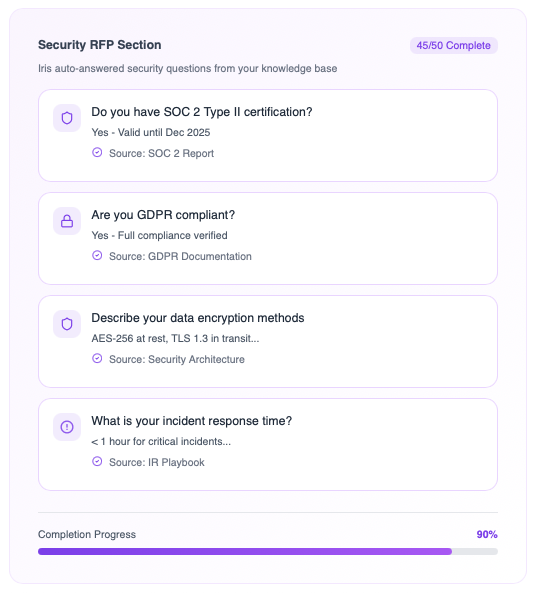
Every portal response is logged automatically — what was submitted, which source document it came from, who submitted it, and when. When a customer questions an answer, you have the receipts.
Timestamped submission log per portal, per question
Source document linked to every submitted answer
Team-level visibility — across Whistic, BitSight, VisioTrust, and every active portal

Portal AutoFill vs. copy-paste
This is not a workaround. It's a repeatable, auditable portal completion workflow.
Features
Portal AutoFill by Iris
Manual Copy-Paste
Time per Portal

Under 20 minutes
2–4 hours
Works Inside the Portal Tab
Chrome extension fills fields in-portal

Requires tab switching
Source Consistency
Unlimited
Varies by rep and source
Audit Trail
Full log, auto-generated
None
Low-Confidence Handling
Flagged for review, never auto-submitted
Guess or skip





_EasiestToDoBusinessWith_EaseOfDoingBusinessWith.svg)
_HighPerformer_HighPerformer.svg)





_BestSupport_QualityOfSupport.svg)


